Working on a large software project often means handling several tasks at the same time.
You may need to build a new feature, review existing code, write test cases, update documentation, fix bugs, or research a technical solution.
Completing every task one by one can take a lot of time. Claude Code provides multiple ways to run AI agents in parallel, allowing different Claude sessions to work on separate tasks at the same time.
In this article, we will understand how to run multiple agents in parallel with Claude Code, the difference between each available approach, and when you should use them.
What Does Running Agents in Parallel Mean?
Running agents in parallel means assigning different tasks to multiple Claude sessions instead of asking one session to complete everything.
For example, while working on a new application, you can assign:
- One agent to review the backend
- One agent to check the frontend
- One agent to write automated tests
- One agent to update project documentation
All these tasks can progress at the same time.
This can improve development speed, reduce unnecessary context inside one conversation, and make large tasks easier to manage.
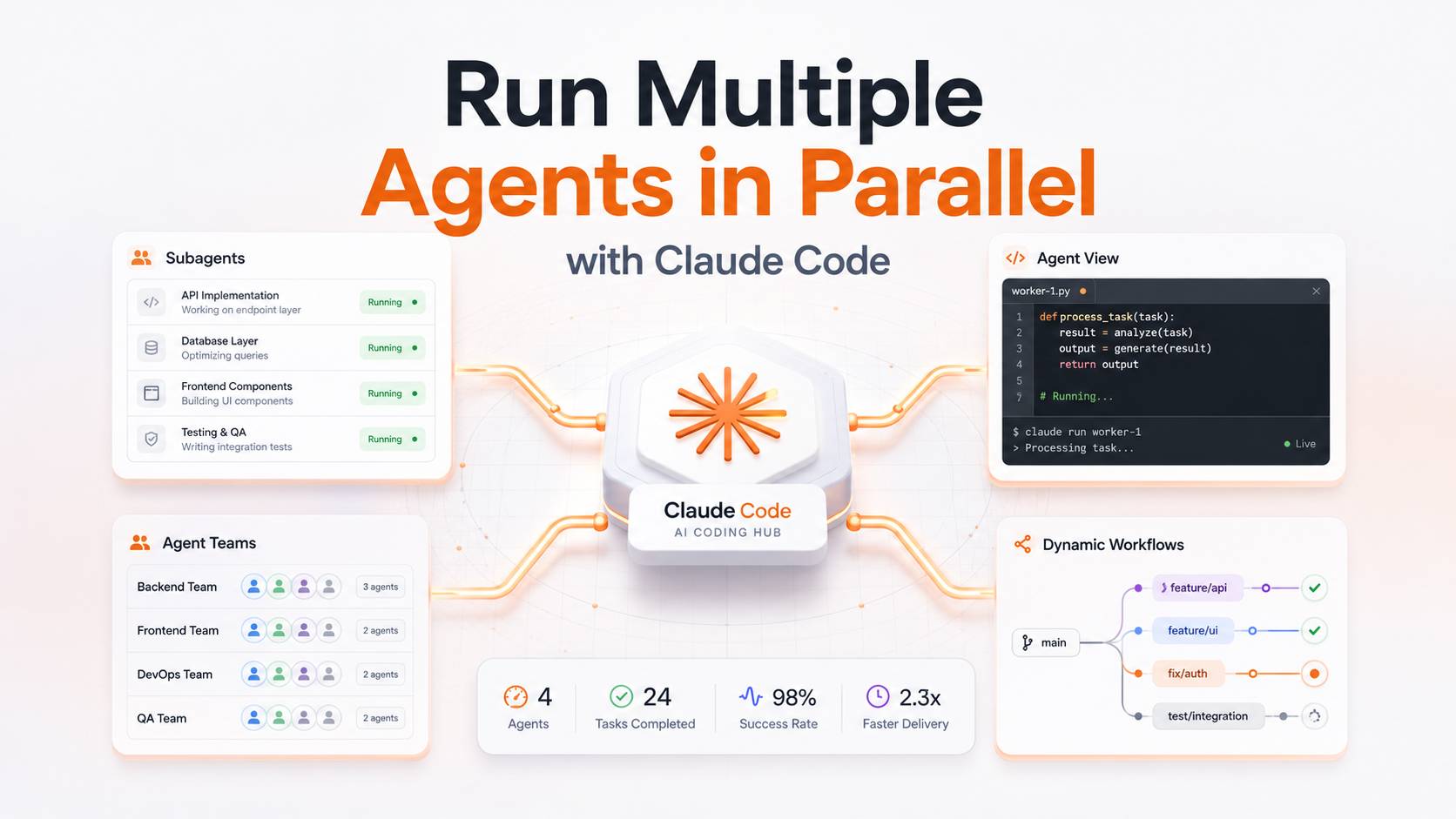
Claude Code provides four main approaches for parallel work:
- Subagents
- Agent View
- Agent Teams
- Dynamic Workflows
Each approach is designed for a different type of development workflow.
1. Subagents
Subagents are additional Claude workers created inside your current Claude Code session.
You continue working in the main conversation while Claude delegates a focused task to a subagent. The subagent works in its own context and returns a summary after completing the task.
Simple Example
Suppose you are building a payment module.
Your main Claude Code session can work on the implementation while separate subagents:
- Review the existing payment code
- Check API documentation
- Identify possible security issues
- Suggest test cases
- Analyse payment failure scenarios
Once their work is complete, the subagents return their findings to the main session.
When Should You Use Subagents?
Subagents are useful when:
- A task requires reading many files
- Research results may make the main conversation too long
- You need a focused code review
- You want to investigate a bug separately
- You need a specialist for one part of the project
- You want Claude to handle task delegation
Subagents are a good choice when you want to stay inside one main conversation while Claude handles smaller supporting tasks in the background.
Important Limitation
Subagents mainly report their results back to the session that created them.
They do not work like a fully connected team where every worker directly communicates with all other workers.
2. Agent View
Agent View provides a single screen where you can start, monitor, and manage multiple Claude Code sessions.
You can open Agent View using:
claude agents
Each session can work on a separate task in the background.
For example, you can create different sessions for:
- Building a new API
- Fixing a production bug
- Updating technical documentation
- Reviewing a pull request
- Improving database queries
- Writing automated tests
You can check the progress of every session from one place and open a session whenever it needs your input.
When Should You Use Agent View?
Agent View is useful when:
- You have several independent tasks
- You want to assign tasks manually
- You want to monitor multiple sessions
- You do not want to stay inside every conversation
- You want to check progress from one screen
- You want to step in only when a session needs help
In Agent View, you are responsible for coordinating the work.
Claude does not automatically manage all sessions as one team. You create the tasks, monitor their progress, and review the final results.
Worktree Isolation in Agent View
Agent View can move each dispatched session into its own Git worktree.
A Git worktree provides a separate checkout of the same repository. This means every session can work on its own copy of the project without immediately affecting the files used by another session.
This is especially useful when multiple Claude sessions are editing code at the same time.
3. Agent Teams
Agent Teams allow multiple Claude Code sessions to work together as a coordinated group.
One session acts as the team lead. The lead can:
- Break a large project into smaller tasks
- Assign tasks to different teammates
- Monitor progress
- Maintain a shared task list
- Coordinate dependencies
- Combine the final results
Team members can also communicate with each other.
Simple Example
Suppose you want to build a complete authentication system.
An agent team may divide the work like this:
- Backend agent: Build login, registration, and authentication APIs
- Frontend agent: Create login and registration screens
- Database agent: Review the user and session database schema
- Testing agent: Write automated test cases
- Security agent: Review validation, permissions, and authentication risks
The team lead coordinates the complete process and keeps all workers aligned.
When Should You Use Agent Teams?
Agent Teams are useful when:
- A project contains multiple connected tasks
- Workers need to share information
- Claude should manage the overall execution plan
- Several technical specialists are required
- Tasks depend on the output of other tasks
- You want one lead agent to supervise the work
Agent Teams are more suitable for coordinated projects than simple independent tasks.
Important Consideration
Agent Teams are experimental and disabled by default.
Team members also do not automatically receive separate Git worktrees. Therefore, you should divide the work carefully so that multiple agents do not edit the same files at the same time.
A practical approach is to assign ownership by:
- Module
- Directory
- Feature
- Application layer
- Service
- File group
This reduces the risk of conflicting changes.
4. Dynamic Workflows
Dynamic Workflows are designed for large and complex tasks that require multiple stages.
Instead of depending only on Claude's decisions inside one conversation, a workflow script controls how the complete process should run.
A workflow can:
- Start multiple subagents
- Divide a large task into smaller tasks
- Collect results from different agents
- Compare findings
- Verify important conclusions
- Run multiple review stages
- Produce one combined result
Simple Example
Imagine that you need to audit a large application containing hundreds of files.
A dynamic workflow could:
- Divide the files into groups
- Assign each group to a separate agent
- Ask the agents to find bugs and security issues
- Ask another group of agents to verify the findings
- Remove duplicate or incorrect findings
- Combine confirmed issues into one final report
This creates a structured and repeatable process.
When Should You Use Dynamic Workflows?
Dynamic Workflows are useful when:
- The task is too large for a few subagents
- Hundreds of files need to be analysed
- Results require cross-verification
- The process contains multiple stages
- You want to reuse the same execution process
- A script should control task coordination
- The work cannot be completed effectively in one conversation
Dynamic Workflows are suitable for:
- Codebase-wide audits
- Large migrations
- Security reviews
- Repository-wide refactoring
- Cross-checked technical research
- Large documentation projects
- Multi-stage quality reviews
Subagents vs Agent View vs Agent Teams vs Dynamic Workflows
Here is a simple comparison of all four approaches:
| Approach | Who Manages the Work? | Best Use Case | Worker Communication |
|---|---|---|---|
| Subagents | Claude inside the main session | Focused supporting tasks | Results return to the parent session |
| Agent View | You | Multiple independent tasks | Sessions are managed separately |
| Agent Teams | Claude team lead | Connected and coordinated project tasks | Teammates can communicate |
| Dynamic Workflows | A workflow script | Large, repeatable, multi-stage processes | Communication follows the workflow design |
How to Choose the Right Approach
You can choose the right approach by asking a few simple questions.
Who Should Coordinate the Work?
Use Subagents when Claude should delegate smaller supporting tasks from your current conversation.
Use Agent View when you want to create and manage multiple independent sessions yourself.
Use Agent Teams when Claude should plan, assign, coordinate, and supervise a group of workers.
Use Dynamic Workflows when a script should control a large and structured multi-stage process.
Do the Workers Need to Communicate?
Use subagents or independent Agent View sessions when tasks do not depend heavily on each other.
Use Agent Teams when workers need to exchange information, coordinate dependencies, and remain synchronized.
Use Dynamic Workflows when information should move through a predefined process.
Will Multiple Agents Edit the Same Files?
When several agents modify the same files, conflicts can happen.
Use Git worktrees to provide separate working directories for different sessions.
For Agent Teams, divide file ownership carefully because teammates are not automatically isolated through worktrees.
What Are Git Worktrees?
A Git worktree gives a Claude session a separate checkout of the same repository.
For example:
- One worktree can be used for backend changes
- One worktree can be used for frontend changes
- One worktree can be used for automated tests
- One worktree can be used for documentation
This allows multiple sessions to work independently without overwriting each other's files.
Benefits of Using Git Worktrees
Git worktrees provide several benefits:
- Agents do not overwrite each other's files
- Every task can use a separate branch
- Changes can be reviewed independently
- Parallel development becomes safer
- Pull requests can remain focused
- Merging becomes easier to manage
- Failed changes can be discarded without affecting other work
Worktrees are especially useful when agents are modifying code instead of only researching or reviewing files.
What Is the /batch Command?
Claude Code also provides the /batch skill for large changes.
The /batch command can divide one large task into multiple smaller tasks and assign them to worktree-isolated subagents.
Each subagent can work on a separate part of the project and open its own pull request.
The /batch command can divide work among approximately 5 to 30 subagents, depending on the size and structure of the task.
It can be useful for:
- Large refactoring tasks
- Repetitive code updates
- Multi-module changes
- Repository-wide migrations
- Framework upgrades
- Standardising code patterns
- Changes that can be divided by directory or component
It is important to understand that /batch is not a separate coordination model.
It is a packaged use of subagents and Git worktrees.
Other Related Claude Code Features
Some Claude Code features may appear similar to parallel agents, but they solve different problems.
Background Bash Commands
A background Bash command runs one shell command without blocking the current conversation.
It does not create another Claude agent.
It cannot independently understand a task, inspect a codebase, make decisions, or return a technical summary like a Claude session.
Forked Subagents
A forked subagent inherits the complete context of your current conversation.
It can be started using:
/subtask
This is useful when the new subagent needs access to the full discussion, decisions, and requirements from the current session.
It is still a type of subagent, not a separate parallel working method.
Background Sessions
You can use:
/fork
to create a background session that runs alongside the current session.
The exact behaviour may depend on whether Agent View is enabled.
Routines
A routine runs a Claude session on a schedule in Anthropic's cloud.
Routines are useful for scheduled automation, but they are not designed for dividing your current software development task among multiple agents.
How to Check Running Work
Claude Code provides different commands depending on how the work was started.
Check Background Sessions
Use:
claude agents
This opens Agent View and shows:
- Running sessions
- Completed sessions
- Current task status
- Sessions waiting for input
- Worktree information
Check Tasks in the Current Session
Use:
/tasks
This command lists background tasks connected to the current Claude Code session.
It can include:
- Running subagents
- Completed subagents
- Background commands
- Other current-session tasks
You can use this list to check progress, attach to a task, or stop it.
Check Dynamic Workflows
Use:
/workflows
This command shows:
- Running workflows
- Completed workflows
- Current workflow phase
- Number of completed agents
- Remaining workflow tasks
Practical Examples for Developers
Here are some practical ways developers can use multiple Claude Code agents.
Feature Development
You can divide a new feature across several agents:
- Agent 1 builds the backend API
- Agent 2 creates frontend components
- Agent 3 writes automated tests
- Agent 4 reviews security and validation
- Agent 5 updates technical documentation
Codebase Audit
For a complete codebase review:
- Agent 1 checks authentication and authorization
- Agent 2 reviews database queries
- Agent 3 finds performance issues
- Agent 4 checks outdated dependencies
- Agent 5 reviews error handling
- Agent 6 verifies test coverage
Large Migration
For a framework or architecture migration:
- Agent 1 updates controllers
- Agent 2 updates services
- Agent 3 updates database queries
- Agent 4 updates frontend integration
- Agent 5 updates automated tests
- Agent 6 verifies backward compatibility
Pull Request Review
For a detailed pull request review:
- Agent 1 checks code quality
- Agent 2 reviews business logic
- Agent 3 checks security risks
- Agent 4 reviews database impact
- Agent 5 runs tests and identifies missing coverage
Documentation Work
For complete project documentation:
- Agent 1 studies the application architecture
- Agent 2 documents the database schema
- Agent 3 documents APIs
- Agent 4 creates setup instructions
- Agent 5 documents deployment steps
- Agent 6 checks whether any important section is missing
Bug Investigation
For a difficult production issue:
- Agent 1 reviews logs
- Agent 2 traces the relevant code flow
- Agent 3 reviews recent changes
- Agent 4 checks database behaviour
- Agent 5 suggests test cases to reproduce the issue
Best Practices for Running Multiple Claude Code Agents
Running more agents does not always guarantee better results.
The quality of task division is more important than the number of agents.
Give Every Agent a Clear Task
Avoid giving every agent the same broad instruction.
A weak instruction may look like this:
Review the complete project.
A better instruction would be:
Review only the authentication module for security, validation, authorization, session handling, and error-handling issues. Do not modify files. Return findings with file paths, impact, severity, and recommended fixes.
Clear instructions reduce duplicate work and improve the quality of the final result.
Define the Expected Output
Tell each agent what it should return.
For example:
- A list of issues
- File paths
- Recommended changes
- Code patches
- Test cases
- A migration plan
- A risk assessment
- A final summary
This makes it easier to combine results from multiple agents.
Avoid Overlapping File Ownership
Do not allow several agents to edit the same files unless there is a clear coordination plan.
Divide work by:
- Module
- Directory
- Feature
- Service
- Application layer
- File group
- Business capability
Use Worktrees for Code Changes
Separate Git worktrees reduce file conflicts and make every agent's changes easier to review.
Each agent can work on a separate branch and prepare an isolated pull request.
Ask Agents to Verify Their Work
Every implementation task should include verification steps.
Ask agents to:
- Run automated tests
- Run linting
- Check build output
- Review changed files
- Confirm existing features still work
- Check for breaking changes
- Validate error handling
- Document assumptions
Review Before Merging
AI-generated code should still go through human review.
Check:
- Business requirements
- Security
- Performance
- Coding standards
- Error handling
- Test coverage
- Database impact
- Backward compatibility
- Deployment risks
Start with a Small Number of Agents
Begin with two or three agents.
Once the task division works properly, you can increase the number of workers.
This makes it easier to manage:
- Token usage
- File conflicts
- Task duplication
- Communication overhead
- Review effort
Keep Tasks Independent Whenever Possible
Parallel agents work best when each task can be completed without waiting for another task.
For example, documentation review and test coverage analysis can often run independently.
However, frontend implementation may depend on backend API design. In that case, define the API contract first or use Agent Teams for better coordination.
Keep Token Usage and Cost in Mind
Every Claude session or subagent uses its own context and tokens.
Running multiple agents at the same time can increase usage quickly.
For example, asking ten agents to inspect the same large codebase may use more tokens than dividing the repository into focused areas and assigning them to three or four agents.
To control usage:
- Give agents focused tasks
- Avoid asking all agents to read the complete repository
- Share only necessary context
- Divide files by module or directory
- Avoid duplicate research
- Stop unnecessary background sessions
- Review whether parallel execution is actually required
Use multiple agents when the time saved is greater than the additional cost and coordination effort.
Which Claude Code Parallel Approach Should You Use?
Here is a simple recommendation:
Use Subagents When
- You need focused supporting work
- You want to stay in one conversation
- Claude should delegate the task
- The result should return to the main session
Use Agent View When
- You have several independent tasks
- You want to manage the sessions yourself
- You want a single monitoring screen
- Each session should work separately
Use Agent Teams When
- Tasks are connected
- Workers need to communicate
- Claude should coordinate the project
- One lead agent should manage the team
Use Dynamic Workflows When
- The task is very large
- The process has multiple stages
- Results need verification
- The workflow should be repeatable
- A script should control execution
Use Git Worktrees When
- Multiple agents will modify code
- You want isolated branches
- You want to reduce file conflicts
- Each task may produce a separate pull request
Use /batch When
- One large change can be divided into many independent parts
- You want multiple worktree-isolated subagents
- You want separate pull requests for different changes
- The work affects many files or modules
Final Thoughts
Running multiple agents in parallel can make Claude Code much more useful for large software development tasks.
The best option depends on the type of work you are doing.
Use Subagents for focused side tasks inside one conversation.
Use Agent View when you want to manage several independent Claude Code sessions.
Use Agent Teams when multiple workers need coordination and communication.
Use Dynamic Workflows for large, structured, and repeatable processes.
Use Git worktrees when several sessions are changing code.
Use /batch when a large change can be divided into isolated tasks and pull requests.
The goal is not to run the highest possible number of AI agents.
The real goal is to divide work clearly, avoid conflicts, verify every result, and complete complex development tasks more efficiently.